
Company knowledge, photos, and brand voice
Turn what your business knows into useful content.
Bring product information, common questions, examples, and photos into your writing workflow. Give readers something more specific than a generic explanation.
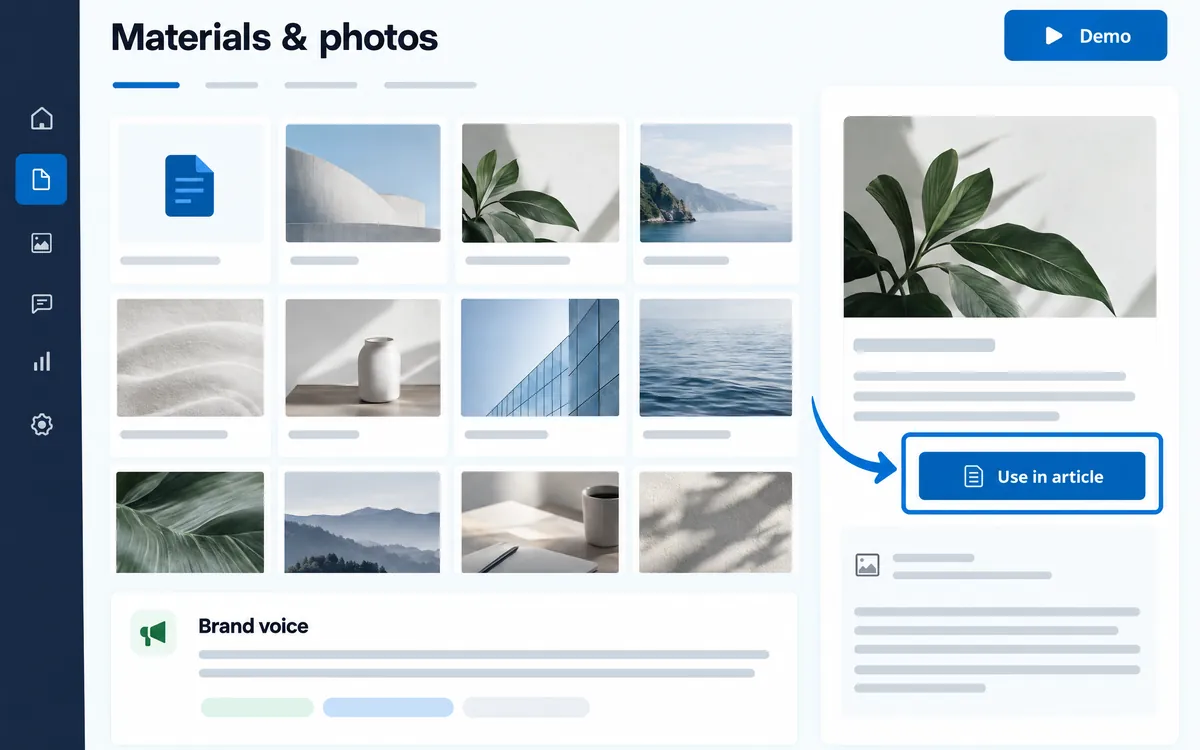
Keep useful materials together
Register URLs, files, and text, then select the materials relevant to each article.
Give photos a clear purpose
Review AI-drafted photo descriptions before using your images in an article.
Keep your voice consistent
Register writing preferences, expressions to avoid, and calls to action so your team has a shared starting point.
The workflow
- Add materials and photos
- Select evidence and voice
- Review how they appear in the article
An example
A product guide can draw on your specification sheet, product photos, and actual customer questions. This is an example workflow, not a customer testimonial.
What you can do on screen
- Register materials as URLs, PDF files, or text, and classify them as Document, Product, Service, or Brand.
- Set where a document applies, such as products and dates. Materials past their expiry date are not used for new articles.
- Photos can receive an AI-drafted description. Only descriptions you confirm are used in articles.
- Register your voice as a writing style, things to avoid, and samples.
- Choose call-to-action types such as download, contact, or sign-up for the pages articles should lead to.
What to know
Registering knowledge is not the same as training a private AI model. Use materials you have permission to use and review confidential information and factual claims.
Can I start with a small amount of material?
Yes. Start with a short product explanation or common questions, then add genuine information rather than invented experiences or results.
Will time-limited materials be used after they expire?
Not if you set the period or expiry date. Materials outside that period are not used for article creation.